Limiting which Syscalls to Trace with Strace

Tracing a program with strace generates a lot of output because of the sheer number of syscalls every program calls during its runtime. This can become overwhelming very quickly, making it hard to analyze the trace and find what you are looking for.

Fortunately, strace has several features that allow you to limit which syscalls it actually traces.

Limiting by Name

The simplest mechanism to limit the number of traced syscalls is by specifying the name of one syscall you want to trace. To do this, you can use the -e flag followed by trace= and the name of the syscall. In this example we trace the /bin/ls program and we only want strace to report the openat syscalls executed by the program:

$ strace -e trace=openat /bin/ls

This should give you an output similar to this:

Continue reading “Limiting which Syscalls to Trace with Strace”

Finding out where Syscalls are Called From: Stack Traces with Strace

One of the great strengths of strace as a debugging tool is that it shows you what a program is doing regardless of whether it was compiled with debug info or not. The downside of this is that you only see the program’s syscall. You can use this information to deduce what is happening in the program but you don’t see from where in the program those syscalls originate.

The good news is that if your program was compiled with debug info strace can actually show a stack trace for every syscall in your binary.

Example

To demonstrate this we just save the following program to hello.c:

#include <stdio.h>

void print_info()
{
    int num = 5;
    printf("== Info ==\n");
    printf("Hello World!\n");
    printf("Num: %d\n", num);
}

int main(int argc, char **argv)
{
    print_info();
    return 0;
}
Continue reading “Finding out where Syscalls are Called From: Stack Traces with Strace”

Introduction to Strace

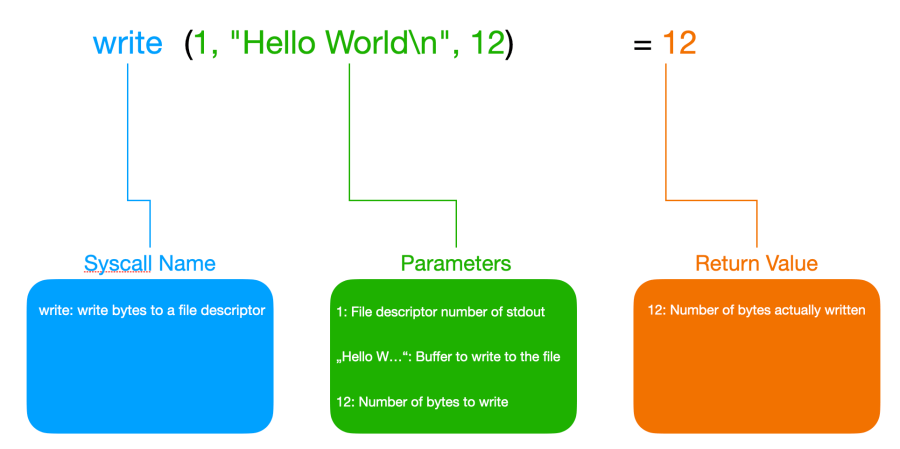
There is probably no debugging tool on Linux that is more valuable and versatile than strace. This tool shows us all the calls a program makes to the operating system, including the data it transmits to the operating system via these calls and the return values sent back by the OS. Therefore, it can give us a very good picture of what a program is doing.

And the best thing is that it works on any program. Neither do we need the source code of the program nor does it have to be compiled with debug information.

Stracing Hello World

To get our feet wet let’s start with the simplest possible example. We will run a Hello World program with strace to see what syscalls such a basic program will make.

So first we save the following program in a file named hello.c:

#include <stdio.h>

int main(int argc, char **argv)
{
    printf("Hello World\n");
    return 0;
}
Continue reading “Introduction to Strace”

Getting started with GDB

Most programmers prefer to write code over debugging it. Unfortunately, code breaks a lot more often than we would like and it often breaks in situations that are hard to debug. Therefore, an essential skill as a programmer is to know how to debug your code (and that of others).

When facing our first bug we all start out with what is called printf debugging. That means we add lines of code that call printf (or any other print function) at relevant places in our code and output values of variables or just print a message that indicates that the execution of the program has reached this particular line in the code. Then we recompile the program, run it, reproduce the problem, and add more printf calls until we find the bug.

There is nothing wrong with printf debugging. It is the most basic method of debugging and it works quite well in many situations and is available to the programmer in nearly any environment. Lots of programs even write a log file during normal operation to help track down problems that happened in production. Log files are nothing else than built-in, glorified printf debugging.

printf debugging is great but it has its limitations. For example, you can’t step through a program line by line or just jump into a specific location and look around exploring the variables and the state of the program at the time.

Whenever you want to check a new variable or data structure that wasn’t on your radar before you have to add new printf statements to the code, recompile it, run it, and get the program into the desired error state. Also, there is no way to halt the program every time a certain variable or memory address is read or modified and see from which line of code the memory access happened.

All these things and more can be done with a debugger. And that is why it is crucial to know a good debugger and know it well.

One of the most popular and powerful debuggers is gdb. And it is also available on more platforms than probably any other debugger. This article will show you everything you need to know to debug your own programs with gdb.

Fixing a simple Crash

Let’s say you write a program in C or C++ and it crashes. While in languages like Java or Python, you will get a full-fledged stack trace all you get in our case is the message “Segmentation fault” in the terminal from which you started your program.

Continue reading “Getting started with GDB”